The Settings to Change First in GTA 6
Updated November 24, 2026
In GTA 6, the useful settings are in the pause menu, under Settings.
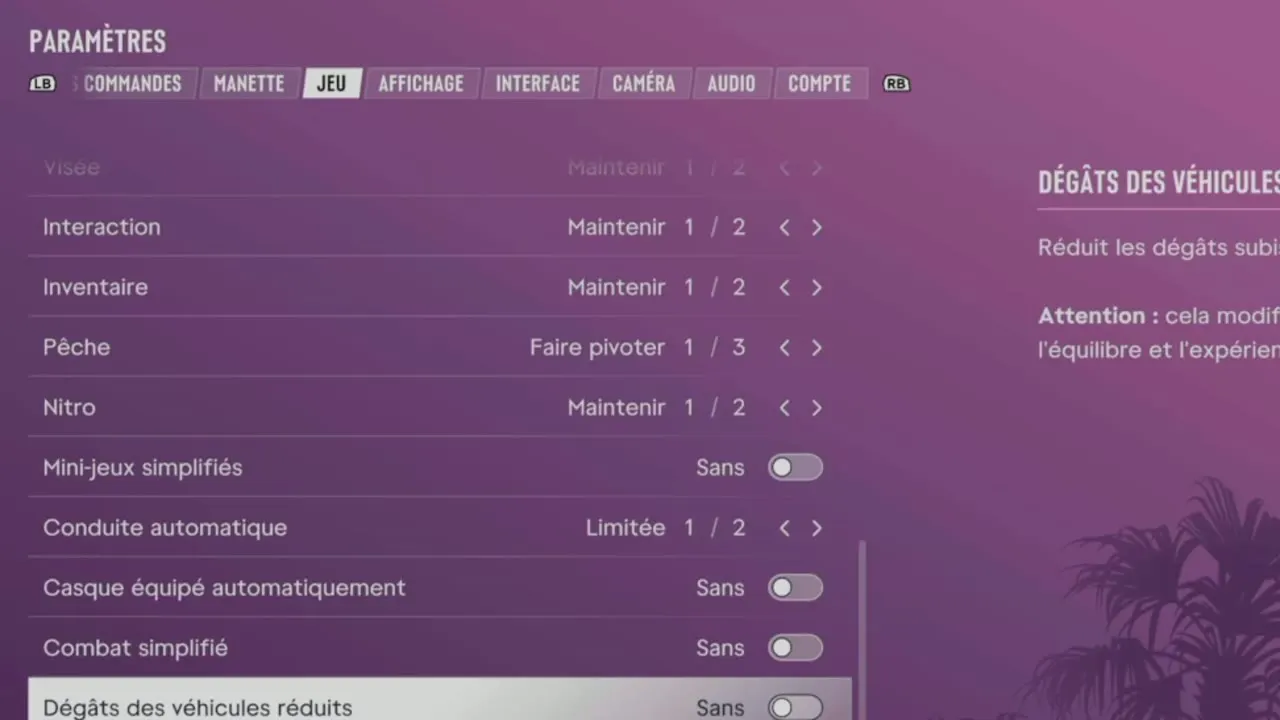
Before playing, check the aiming mode, aim assist, blur and camera shake, subtitles and accessibility assists: these are the most useful ones.
Where are the settings?
Open the pause menu (Options on PS5, Menu on Xbox Series) then Settings. The guides mention several tabs: Gameplay, UI, Display, Camera, Controller and Audio. The first setting is the control scheme: Default, Classic or Left-Handed. The Classic scheme is closer to the controls of the older GTA games; see our page on the controls.
Aiming
In the Gameplay tab, there are three targeting modes: Lock-On, Partial (the reticle is pulled toward a nearby target) and Free Aim (never locks on). The strength of the assist is set separately, with “Aim Assist Strength”, from 0 to 4. Opinions differ: one guide recommends 4 to hit distant enemies, another suggests 0 for raw aiming. If you are starting out on a controller, begin high and lower it as you get used to it. Other assists exist, such as Shooting Assist and Drive-By Assist for aiming from a vehicle. We also saw the “aim assist” and “partial aim” settings in our own playthrough.
Camera, blur and comfort
- Motion Blur Strength: can be set to 0 if the blur bothers you when driving.
- Camera Shake, Camera Bob, Weapon Sway: can be reduced, down to zero, for a steadier image.
Subtitles
By default, subtitles may be limited to missions (“Mission Only”). Set them to “On” to follow all dialogue, and increase their size if you play from a distance. According to the guides, they are in the Interface or Audio menu: the exact location varies.
Accessibility assists
They are at the bottom of the Gameplay tab. You can replace holds with simple presses (Hold Assist, Tap Assist), or the other way around. The “Simplified mini-games”, “Accessible combat” and “Reduced vehicle damage” options clearly change the difficulty. We saw them in our playthrough: they help, but change the balance of the game. Also think about auto drive, which is set in the same menu.
For more good habits at the start, read our beginner tips.
On video, on the channel

Sources and updates
- Games.gg, « GTA 6 accessibility settings guide » (page dated November 23, 2026)
- KeenGamer, « Best GTA 6 settings to change first » (page dated November 23, 2026)
- SVG, « 5 essential GTA 6 features you have to enable yourself » (page dated November 23, 2026)

Information cross-checked and verified on November 24, 2026. We only publish a combination or a figure when several reliable guides give the same thing. Spotted a mistake or a confirmed code? Write to us from the contact page.
Frequently asked questions
Which aiming mode should you choose in GTA 6?
There are three modes: Lock-On, Partial and Free Aim. The guides differ: Lock-On is the simplest for beginners, Free Aim demands more precision.
How do you reduce motion blur?
In the Display menu, set “Motion Blur Strength”, which you can set to 0. You can also reduce camera shake in the Camera tab.
How do you get all subtitles?
Set “Subtitles” to On rather than Mission Only, and adjust their size in the settings.
Can you make the game easier?
Yes, with accessibility options such as accessible combat, reduced vehicle damage or simplified mini-games.
Related guides
- Auto DriveWaypoint, cinematic view, button to hold: turn on Auto Drive step by step.
- PS5 and Xbox ControlsThe controls the guides agree on, for PS5 and Xbox Series.
- Beginner tipsGTA 6 beginner tips: protect your money, Focus mode, shaking off the police, WAiNK, getting around, training J
- Saving Your GamePause menu, manual slots, autosave: everything you need to know so you never lose progress.
- Phone and AppsWAiNK, BuckMe, RydeMe, Scooter Bros: what each phone app is for.
- Trophies and achievementsFull list of the 55 GTA 6 trophies and achievements (PS5, Xbox): requirements, hidden trophies, platinum time
- FishingWhere to fish, how to hook and tire a fish, and the no-kill rule.
- HuntingUnlocks in chapter 2 with Bret, clean shots and selling carcasses.
- All cheat codesFull list of all 61 GTA 6 cheat codes on PS5 and Xbox Series: 17 confirmed combinations, the unlock challenge
- Fast moneyHow to make money fast in GTA 6: vault heists, cars for Randy, jewelry stores, gangs. Earnings by chapter, plu
- Missions listGTA 6 walkthrough: all 91 story missions in 5 chapters, the chapter 1 list in order (Prologue, Gone Fishing...